

JavaScript is one of the most widely used programming languages today, powering everything from interactive web pages to server-side applications. A significant aspect of JavaScript’s flexibility lies in its ability to handle asynchronous operations. Two primary techniques for managing these operations are callbacks and promises. In this article, we’ll delve deep into both concepts, outlining their differences, use cases, and best practices to help you make informed decisions when working with asynchronous JavaScript code.
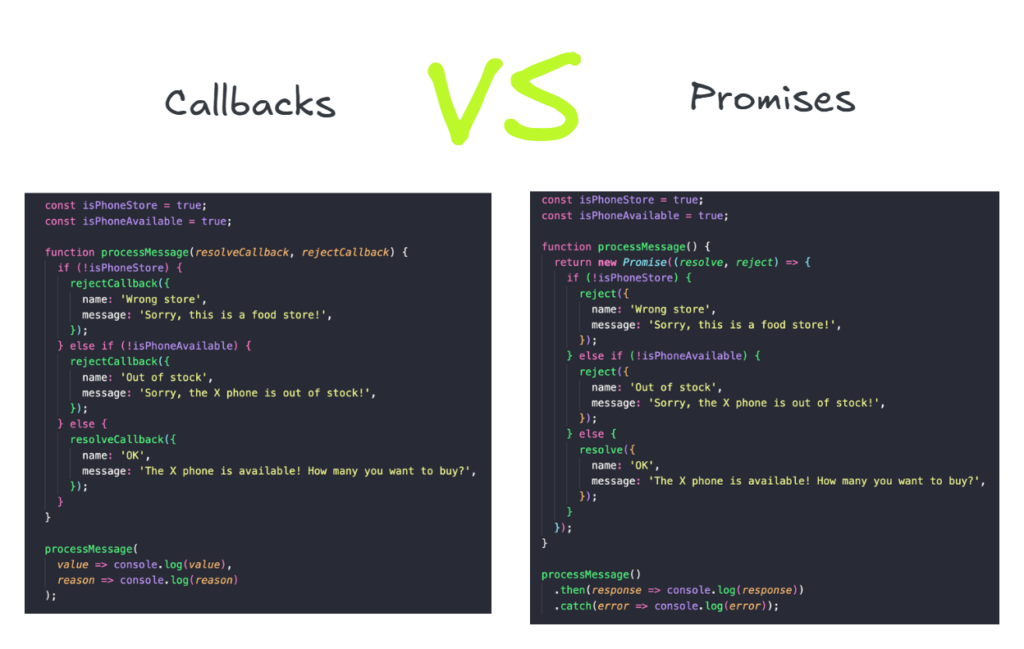
What Are Callbacks?
A callback is a function passed as an argument to another function and is executed after the completion of that function. Callbacks have been a core part of JavaScript since its inception, especially in handling asynchronous tasks like reading files, making API calls, or interacting with databases.
How Callbacks Work
Here’s an example of a basic callback function:
function fetchData(callback) {
  setTimeout(() => {
    console.log("Data fetched");
    callback();
  }, 1000);
}

function processData() {
  console.log("Data processed");
}

fetchData(processData);
In this example, the fetchData function takes another function (processData) as an argument. Once the data fetching operation is complete, the processData function is called.
Benefits of Callbacks
- Simple and Direct: For straightforward operations, callbacks are easy to implement.
- High Compatibility: Callbacks are supported in all JavaScript environments.
Drawbacks of Callbacks
- Callback Hell: When callbacks are nested, the code can become difficult to read and maintain. For example:
getData(function(data) {
  processData(data, function(processedData) {
    saveData(processedData, function() {
      console.log("Data saved");
    });
  });
});
This nesting creates a structure that’s hard to debug and maintain.
- Error Handling: Managing errors in deeply nested callbacks is cumbersome.
What Are Promises?
A Promise is an object that represents the eventual completion or failure of an asynchronous operation. Promises provide a cleaner and more manageable way to handle asynchronous tasks, introduced in ES6.
The Structure of a Promise
A Promise has three states:
- Pending: The operation is ongoing.
- Fulfilled: The operation completed successfully.
- Rejected: The operation failed.
const fetchData = new Promise((resolve, reject) => {
  const success = true;

  setTimeout(() => {
    if (success) {
      resolve("Data fetched successfully");
    } else {
      reject("Error fetching data");
    }
  }, 1000);
});

fetchData
  .then(data => {
    console.log(data);
  })
  .catch(error => {
    console.error(error);
  });
Benefits of Promises
- Avoiding Callback Hell: Promises allow chaining, making the code more readable:
fetchData()
  .then(processData)
  .then(saveData)
  .then(() => console.log("All tasks completed"))
.catch(error => console.error("Error:", error));- Better Error Handling: Errors propagate down the chain, so you only need one
.catch(). - Built-in Methods: Promises come with helpful methods like
Promise.allandPromise.racefor managing multiple asynchronous tasks.
Drawbacks of Promises
- Complexity in Simple Tasks: For very basic operations, Promises might feel like overkill.
- Learning Curve: Beginners may find Promises harder to grasp compared to callbacks.
Key Differences Between Callbacks and Promises
| Feature | Callbacks | Promises |
|---|---|---|
| Syntax | Nested functions | Chaining with .then() |
| Error Handling | Requires explicit checks | Centralized with .catch() |
| Readability | Can lead to callback hell | Cleaner and more readable |
| Scalability | Harder for complex tasks | Easier for complex workflows |
When to Use Callbacks vs Promises
Callbacks
Callbacks are ideal for:
- Simple, one-off asynchronous tasks.
- Environments where Promises are not supported (though this is rare today).
Promises
Promises are better suited for:
- Complex asynchronous workflows involving multiple steps.
- Scenarios requiring better error handling and readability.
- Modern JavaScript applications where ES6+ features are used.
The Evolution Towards Async/Await
JavaScript’s async/await syntax, introduced in ES2017, builds on Promises to simplify asynchronous code further. It allows developers to write asynchronous code that looks and behaves like synchronous code.
Here’s an example:
async function handleData() {
  try {
    const data = await fetchData();
    const processedData = await processData(data);
    await saveData(processedData);
    console.log("All tasks completed");
  } catch (error) {
    console.error("Error:", error);
  }
}

handleData();
Benefits of Async/Await
- Synchronous-Like Code: Easier to read and debug.
- Error Handling: Works seamlessly with
try/catchblocks.
Best Practices
- Always use
try/catchfor error handling. - Avoid mixing
async/awaitwith.then()for consistency.
Best Practices for Using Callbacks and Promises
For Callbacks
- Keep the nesting shallow.
- Use named functions instead of anonymous ones for clarity.
For Promises
- Chain Promises properly to avoid unhandled rejections.
- Use
Promise.allfor parallel execution of tasks. - Prefer async/await for readability where possible.
Conclusion
Understanding how to handle asynchronous operations effectively is crucial in modern JavaScript development. The debate between promises vs callbacks is significant when choosing the right approach. While callbacks are straightforward and useful in simple scenarios, they can lead to deeply nested code that is hard to maintain. Promises offer a cleaner alternative with better error handling and chaining capabilities. With the introduction of async/await, writing asynchronous code has become even more intuitive, making JavaScript development more efficient.
When deciding between callbacks vs promises, consider the complexity of your task. For simple operations, callbacks may suffice, but for more scalable and readable solutions, promises or async/await should be preferred. By following best practices, you can write clean, maintainable, and error-free asynchronous JavaScript code.
FAQs
Can I use Promises and Callbacks together?
- Yes, you can combine promises and callbacks. For example, a promise can resolve once a callback-based function completes. However, it’s better to stick to one approach for consistency.
What is callback hell, and how do I avoid it?
- Callback hell occurs when callbacks are deeply nested, making code hard to read and maintain. To avoid it, use named functions, promises, or async/await.
Are Promises slower than Callbacks?
- No, promises are not inherently slower than callbacks. The performance difference is negligible in most real-world scenarios.
How does error propagation work in Promises?
- Errors in promises propagate down the chain until they are caught by a
.catch()block.
Should I use async/await instead of Promises or Callbacks?
- Async/await is built on promises and provides a cleaner syntax. It’s generally recommended for modern JavaScript code.

Written by
Metana Editorial
Powered by Metana Editorial Team, our content explores technology, education and innovation. As a team, we strive to provide everything from step-by-step guides to thought provoking insights, so that our readers can gain impeccable knowledge on emerging trends and new skills to confidently build their career. While our articles cover a variety of topics, we are highly focused on Web3, Blockchain, Solidity, Full stack, AI and Cybersecurity. These articles are written, reviewed and thoroughly vetted by our team of subject matter experts, instructors and career coaches.
More from Metana Editorial →